Critical infrastructure needs more than cameras that record
Recent incidents in the Netherlands and Germany once again show how vulnerable critical infrastructure can be. And they raise an…


Recently, we introduced Video Language Models (VLMs) within the Vaidio platform. In a previous article, we explained how this technology enables video to be not only analyzed, but truly understood. This technology forms the foundation for a new capability offered by Vaidio as a Vision AI platform: Prompt Enhanced Search.
Prompt Enhanced Search makes it possible to search video using natural language, instead of relying on fixed filters or rule-based configurations. In our previous article, we explored what Video Language Models are and why they are so important. In this follow-up, we look at how this technology works in practice within Vaidio and the benefits it brings to end users.
But before we dive deeper into Prompt Enhanced Search, let’s briefly revisit the basics: what exactly are Video Language Models?
In short, Video Language Models enable Vaidio to connect visual information with language. By combining computer vision, temporal understanding, and language models, the platform can understand what is happening in a video — not just at a single moment, but over time.
Instead of analyzing video as a series of isolated detections, VLMs allow the system to recognize events, behavior, and context, and describe them in human-readable language.
Video search within Vaidio has traditionally been based on:
This approach provides powerful detection and search capabilities. However, as environments become more complex and organizations deal with increasing volumes of video data, new challenges arise that are harder to address with the original filter-based approach offered by the Vaidio platform. With Prompt Enhanced Search (PES), we introduce a fundamentally different way of working with video.
Instead of navigating through menus and filters, users can now simply define a prompt, such as:
Vaidio interprets these prompts using Video Language Models and automatically searches across the configured cameras, time periods, and detected events to find exactly those situations.
Prompt Enhanced Search in Vaidio is powered by the same VLM technology that was recently added to the platform.
When a user enters a prompt, Vaidio performs the following steps:
Instead of searching for individual detections, Vaidio searches for events and behavior in context. This enables answers to questions that previously required manual investigation or multiple search actions.
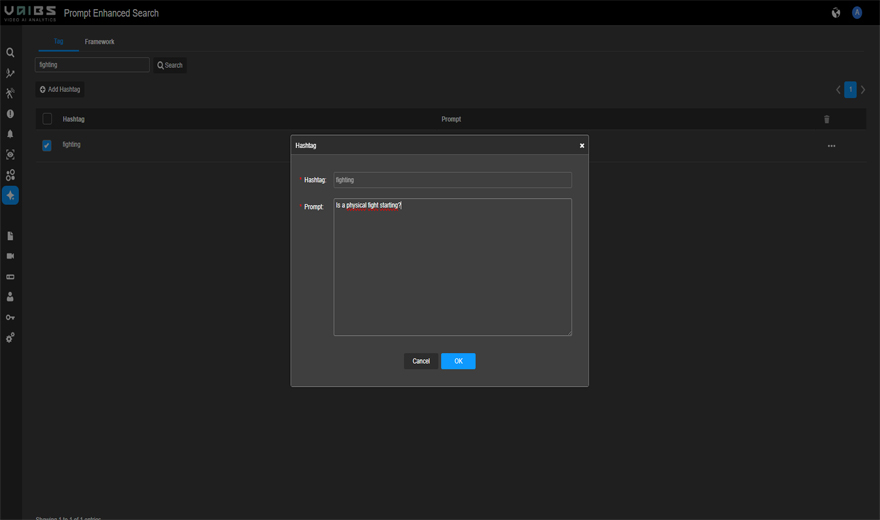
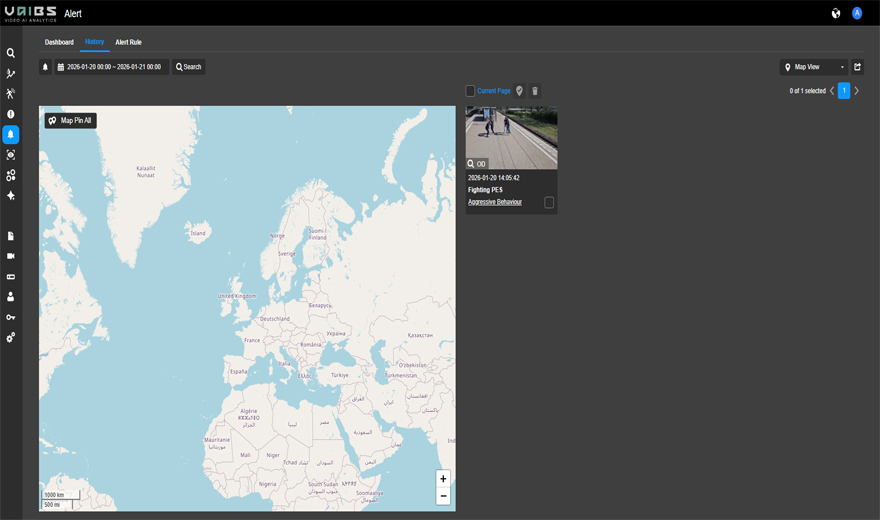
Prompt Enhanced Search within Vaidio can be used not only to find situations after the fact, but also to create alerts. When a prompt is defined, it is automatically enriched with a unique hashtag (#). By linking these prompts to selected cameras, Vaidio can continuously monitor and automatically generate an alert via the hashtag as soon as the described scenario occurs. In this way, natural language becomes the basis for flexible, context-driven detection. Of course, these alerts can be integrated with external VMS/PSIM platforms and other systems.
Prompt Enhanced Search significantly reduces the time required to find relevant video footage. Operators and analysts no longer need to manually reconstruct events; instead, they simply describe what they are looking for and receive immediate results.
This is especially valuable for incident analysis, forensic investigations, and operational evaluations.
Not every Vaidio user is a video analytics specialist. Prompt Enhanced Search enables security teams, operators, and analysts to work with video in an intuitive way by simply asking questions in plain language.
As a result, advanced search capabilities become accessible to a much broader group of users within the organization.
Because Vaidio evaluates sequences of actions rather than isolated triggers, Prompt Enhanced Search delivers more context-aware results. This helps distinguish normal behavior from situations that truly require attention.
For example, Vaidio can recognize the difference between:
Prompt Enhanced Search operates on top of existing Vaidio installations and camera networks. No complex reconfiguration is required. Organizations can immediately ask deeper and more relevant questions about the video data they already have in Vaidio, unlocking insights that were previously difficult or time-consuming to obtain.
Prompt Enhanced Search clearly demonstrates how Video Language Models translate into tangible functionality within Vaidio. It marks the shift from searching for detections to searching for situations.
By introducing natural language as the interface for video, we continue the evolution from traditional video analytics toward Vision Intelligence — where video becomes an understandable, searchable information source that supports faster decision-making and deeper insight.