Skip to content

Vaidio now supports SIA DC-09 for direct alarm transmission to control rooms

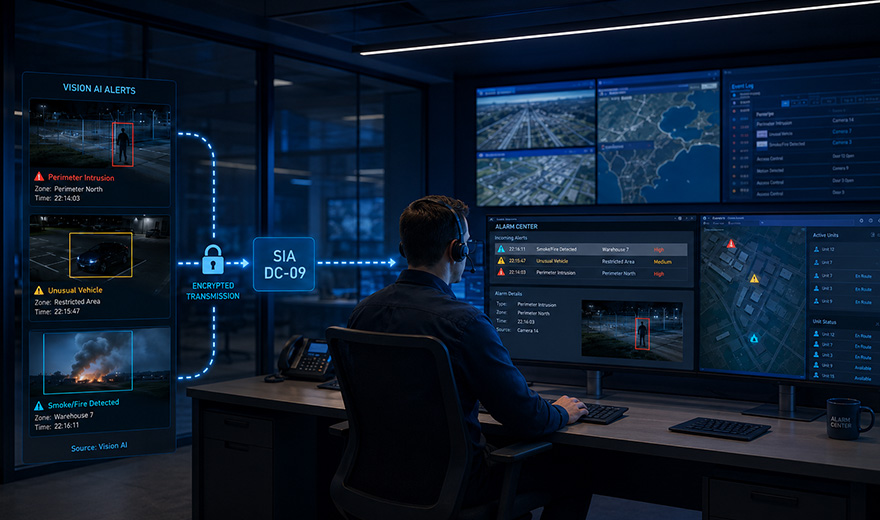
control room operator sitting behind his desk, screening computer screens.

VAIBS now supports the SIA DC-09 protocol within Vaidio. This allows alarm notifications generated by the Vision AI platform to be transmitted directly to an alarm receiving centre or security control room.

Events detected by Vaidio can therefore be integrated directly into existing alarm response processes. Examples include a person entering a secured perimeter, a vehicle remaining stationary in an unusual location for an extended period, or the detection of smoke and fire.

The operator receives the notification within the familiar monitoring environment and can assess and handle the alarm in accordance with existing procedures.

What is SIA DC-09?

SIA DC-09 is an international standard for transmitting alarm events over an IP network from a secured location to a central monitoring station.

The protocol enables different security systems and alarm receivers to exchange information in a standardised way. A notification may, for example, include information about:

  • the connected site, object or location;
  • the type of alarm;
  • the relevant zone or camera;
  • the time of the event;
  • a restore or status notification.

SIA DC-09 was developed to support open and interoperable alarm transmission over IP. As a result, monitoring centres do not need to implement a separate alarm reception method for every individual technology provider.

From video detection to a control-room alarm

Vaidio analyses live and recorded camera footage using Vision AI. As soon as the platform detects a predefined event, it can automatically generate an alarm notification.

Thanks to SIA DC-09 support, this notification can then be transmitted to a compatible receiver within the monitoring centre.

A typical process may look as follows:

  1. A camera is connected to the Vaidio platform.
  2. Vaidio detects a predefined event.
  3. The platform generates an alarm notification.
  4. The relevant event information is transmitted securely and with encryption to the monitoring centre via SIA DC-09.
  5. The notification appears within the existing control-room workflow.
  6. The operator assesses the alarm and takes action where necessary.

The Vision AI detection therefore becomes part of the regular alarm response process, without requiring operators to continuously monitor separate dashboards or camera feeds.

Benefits for monitoring centres and alarm receiving centres

The integration of Vaidio with SIA DC-09 makes it easier to incorporate Vision AI into established security operations.

Key benefits include:

  • direct transmission of Vision AI alarms to the monitoring centre;
  • integration with existing alarm response procedures;
  • standardised communication between different security systems;
  • reduced need to continuously monitor separate interfaces;
  • faster assessment and response by control-room operators;
  • support for secure and encrypted IP-based alarm transmission.

By combining intelligent video analysis with a widely adopted alarm transmission standard, organisations can add Vision AI to their existing security infrastructure without unnecessarily changing established control-room processes.

Henk-Jan Hop

Smart cameras. Smarter insights.

Also interesting to read

Bas Commandeur

Sales Support
Contact

Contact

Bas Commandeur

Sales Support
Contact

Demo aanvragen

Bas Commandeur

Sales Support
Contact

Contact (ENG)

"*" indicates required fields

Bas Commandeur

Sales Support
Contact

Request a demo

"*" indicates required fields

Bas Commandeur

Sales Support
Contact

Demo aanvragen (DUI)

"*" indicates required fields

Bas Commandeur

Sales Support
Contact

Contact (DUI)

"*" indicates required fields

Bas Commandeur

Sales Support
Contact

Word een partner!

"*" indicates required fields

1Bedrijfsgegevens
2Persoonsgegevens
3Diensten
Bedrijfsnaam
Adres*

Bas Commandeur

Sales Support
Contact

Download de VAIBS Brochure (NL)

"*" indicates required fields

Bas Commandeur

Sales Support
Contact

Download de VAIBS Brochure (ENG)

"*" indicates required fields

Bas Commandeur

Sales Support
Contact

Download de VAIBS Brochure (DUI)

"*" indicates required fields

Bas Commandeur

Sales Support
Contact

Download de whitepaper gezichtsherkenning

"*" indicates required fields

Bas Commandeur

Sales Support
Contact

Download de VAIBS Brochure Zorg (NL)

"*" indicates required fields

Bas Commandeur

Sales Support
Contact

Become a Partner!

"*" indicates required fields

1Company details
2Personal data
3Services
Type of partner
Company name
Address*

Bas Commandeur

Sales Support
Contact

Werden Sie Partner!

"*" indicates required fields

1Unternehmensdaten
2Persönliche Daten
3Dienstleistungen
Partnerkategorie
Firmenname
Adresse*